Tag Archive for: best trade association management software

Why Most Membership Websites Stall and How to Launch in 30 Days

When your organization is ready to launch a membership website it should feel exciting.

Instead, for many associations and member-based organizations, it can be slow, confusing, and frustrating. Weeks turn into months. Volunteers get overwhelmed. Approvals are slow to come. No one is quite sure who is responsible for what.

The truth is this, most membership websites do not stall because of bad software. They stall because there are no clear plans or detailed checklists.

If you want to launch a new membership system in 30 days, I believe you need structure, organization, accountability, and someone with experience to hold your hand along the way to explain your numerous options and help you make educated decisions the first time.

Why Most Membership Websites Stall

Because of the work I have done with clients implementing MembershipWorks, I see similar patterns and I can help you avoid them. I want to give you and your team a more stress-free experience.

  1. Volunteer or Staff Bandwidth is Limited

Most membership organizations rely on volunteers or a few staff members.

Volunteers are generous, capable, and mission driven, but they likely already have full time jobs or they lack the intuitive nature and skills to figure out something new. Adding “set up a new membership platform” to their list often leads to delays. I get it. This process requires commitment for a short period of time. The longer a launch drags on, the more energy it loses.

  1. No Clear Process

When everyone is responsible, no one is responsible.

Who is defining membership levels?
Who is drafting the welcome email and renewal notice emails?
Who is setting up the payment gateway?
Who is testing before we launch?
Who will manage the system after it’s completed?

Without a clear roadmap and a single point of leadership, I have seen my inquiries go unanswered. I send an email with questions, and no one responds because they think it’s not up to them, someone else will respond and take responsibility.

  1. Domain Names and Payment Gateway Accounts

I have worked with nonprofits who could not figure out where their domain name was registered or how to transfer it to a new hosting provider (if required). They didn’t know who owned it officially. In one instance, the person who set it up passed away, and it was in their personal name, yikes. Getting and keeping ownership of your domain name and your hosting account is important. You should be clear about these things before we set up MembershipWorks and maybe a new website to go with it.

Related to this is the payment processing or payment gateway account.

If you have one already, do you have access to it?
If you need a new payment processor account, should you use Stripe or PayPal?
Should you allow offline payments (paper checks) or keep it strictly online?

If these questions are not answered early, the technical setup becomes messy. The project is delayed until this information is confirmed. It can get stressful when your organization isn’t prepared before we even start to configure MembershipWorks. I can help get your ducks in a row.

  1. Trying to Do It All Internally

Some organizations try to save money by doing everything themselves. You may have even already set up your account with MembershipWorks and started the process. That’s great.

However, because it’s new to you, it often takes you much longer to figure things out, settings and checkboxes might get overlooked, things don’t flow or show up at all on your website. I know, I’ve had clients call me saying, “I started, but I’m stuck and need help.” I don’t want you to struggle and get frustrated or give up. I appreciate your initiative. I want to help; I enjoy this kind of work, that’s why I specialize it in!

There are many elements and options, and I work in this system daily, so let me help you get it set up and train you on how to manage it moving forward. Asking busy staff or volunteers to become software implementation experts is rarely the best use of their time.

If you’re a website designer looking for a MembershipWorks implementation partner, learn more on my Developer Partners page.

The Real Cost of Delaying Your Membership Website Launch

Every month you delay:

  • You delay membership and donation revenue
  • You delay automation that could save hours of admin time
  • You delay better member communication and engagement
  • You delay growth

And perhaps most importantly, you just might increase the frustration among the very people who care most about your mission. I don’t want you or them to get burnt out.

How to Launch Your Membership Website in 30 Days

A successful membership website process requires clarity, structure, and action. Three of my top strengths (according to the StrengthsFinder Assessment) are Activator, Communicator, and Focus. These strengths help me immensely with MembershipWorks implementation services. You can read what each one means on my StrengthsFinder post. I highly recommend leadership teams know and understand each others strengths.

To make it easier for my clients to navigate this process, I created a structured Membership Launch Framework™ that focuses on:

  1. Clear Decisions Up Front

We define:

  • Membership levels
  • Pricing and renewal structure
  • Payment processing
  • Required custom fields and labels
  • Online sign-up forms, donations, shops items
  • Email notification language and frequency
  • Your membership information and prep it for data migration
  • Member only content and website navigation/sign-in structure

Before technical setup begins, we make the key decisions together or I give you the information to get feedback from your team so you can decide. This prevents rework and confusion later. I will provide my input and examples of what has worked for my clients in the past that might be helpful to you too.

  1. Expert Setup, Done for You

Instead of asking volunteers to figure it out, I will handle the primary system setup for you. There are a lot of details and customization to complete during the setup. Let me help.

This saves you time.
This reduces your frustration.
This keeps your project moving forward.

Volunteers or staff can stay focused on strategy, leadership, and member engagement, instead of struggling with configuration options.

  1. Training Your Admin to Maintain It

My goal is not to create dependency. After MembershipWorks and your website are properly set up, I train you or team so you can confidently:

  • Assist members
  • Run reports
  • Send email communications
  • Manage the renewal and new member process
  • Update and export the database
  • Find answers to questions

You get a strong foundation, and your team gets the skills to sustain it.

  1. A Defined 30-Day Timeline

When there is a clear timeline, momentum builds. If you need your implementation done in 30 days, it’s possible. Most of the time we take 30-60 days, but I can move quickly if you can.

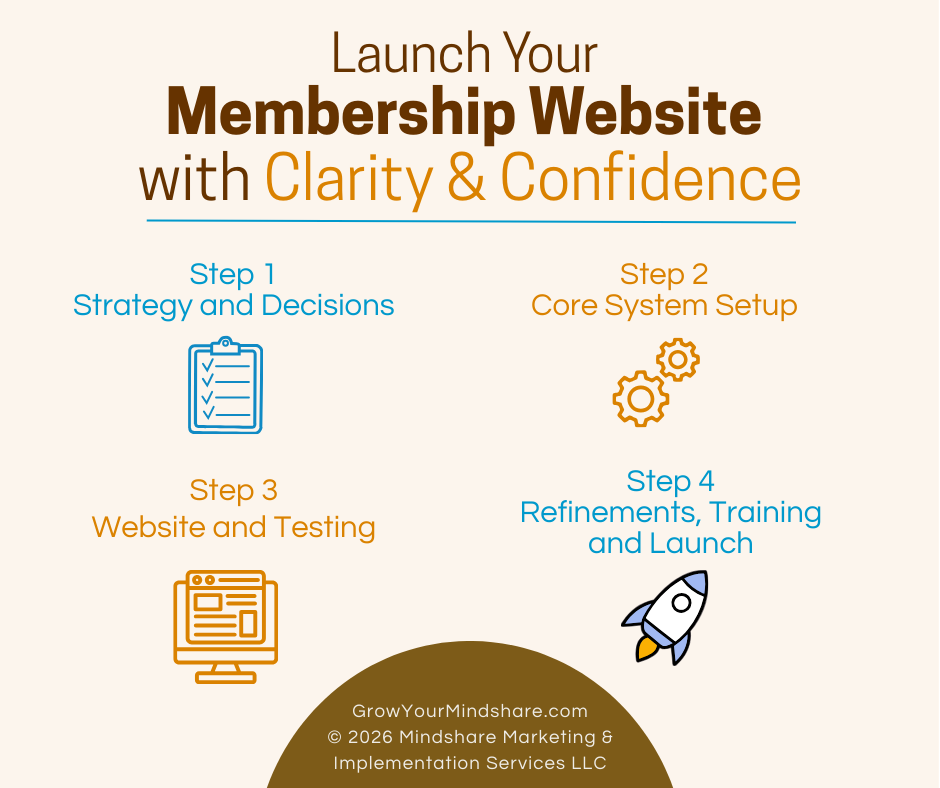
Step 1 – strategy and decisions
Step 2 – core system setup
Step 3 – website and testing
Step 4 – refinements, final training and launch

Instead of endless meetings and dropped balls, you move forward with clarity.

Save Time, Reduce Volunteer Strain, and Launch with Confidence

I know you care about your mission. You should not be overwhelmed by software implementation. By hiring me as your experienced membership implementation specialist, you:

  • Protect staff or volunteers’ time
  • Avoid costly setup mistakes
  • Launch faster
  • Start collecting revenue sooner
  • Reduce frustration across your leadership team
  • Gain confidence knowing it was all set up correctly

A new or improved membership website does not have to stall.

With the right framework, the right structure, and the right support, you can confidently launch in 30 days. If that’s too fast, we can work over a period of 60 days. We just don’t want it to drag on. We want to keep everyone engaged until it’s complete, then celebrate!

Let’s Connect

The best first step is to schedule a simple phone call with me. I’d like to learn about your organization and where you are in the process of creating a better membership system for your small business, nonprofit or membership-driven organization.

During our call we can decide if you’d like to schedule a personalized demo via zoom or move right into working on the MembershipWorks Implementation Framework™ project management questionnaire.

You can see a few websites I have set up with MembershipWorks and read testimonials on my Completed Websites page.

Questions? You can send me an email too.

Michelle Aspelin
MembershipWorks Implementation Specialist
My Developer Profile on MembershipWorks.com
Call/Text: 952-484-6015
Mindshare Marketing & Implementation Services LLC
membership website launch graphic with 4 steps

How to earn REVENUE with MembershipWorks to offset the cost of the membership software – a monetization opportunity

By Michelle Aspelin of Mindshare Marketing & Implementation Services LLC

View my MembershipWorks Developer Profile

If you are considering implementing MembershipWorks (MW) on your WordPress website but want to defray the costs of this amazing membership software, you will like what you read here. If you already have MW, you can still add some of these elements to your website to help offset the cost of your monthly membership fee with MembershipWorks (see pricing). Keep in mind, these are in addition to the customary ways that websites can defray costs like selling advertising on their website. Even if you choose just one of these, it could be all you need to essentially get MembershipWorks for free! MembershipWorks is an opportunity to monetize your website.

The same opportunity exists with the first three elements/features on the list below. You can charge a posting fee for these elements either to your members, nonmembers, or both. It’s easy to earn revenue with MembershipWorks.

You can include the opportunity to post in one of these elements as a benefit to your members for the amount of your current membership. Gaining you more members who value this benefit.

You can create a new Membership Level or Membership Add-on and upsell your current membership.

You can offer your members a discount on the cost of making a post on one of these first three revenue ideas.

1. Classified Ads Posts – create a community or member only marketplace. Give your members and website readers first dibs on items your members are selling. Helps generate website traffic as well as revenue for your company, organization, club, nonprofit, etc.

2. Announcement Board Posts – bring your members to your website vs relying on Facebook or other third-party sites. Your Announcement Board can be a public board anyone on the website can view or for members eyes only. Posts can be specific to your organization and offer a benefit to members and others. Helping your website be the “go to” site for news in your industry. See DEMO Announcement Board

Announcement Board screenshot

3. Job Board Posts – allowing posts like this on your website could help your site become a career hub. You could charge employers a fee to list jobs on your board that your members would be interested in. Or your members might be the ones doing the hiring for their own organization. Here’s what MW says about the Job Board feature:

“Job Boards are a powerful retention tool. Members who find a job through your website are more likely to renew their membership so that they can stay on top of career opportunities. If you make the Job Board only available to current members, prospective members are also incentivized to join.”

4. Shopping Cart – create a Shopping Cart to sell items on your website to your members only or make the marketplace public and sell to everyone. Items can be physical products you mail or ship to your buyers or digital content. You can offer item options, quantities, and limits. You can sell sponsorships for your events, expos and other opportunities by using the Shopping Cart feature.

5. Forms – use a Form for a one-time thing like signing up for a class or workshop where you can charge a registration fee. You can also use a Form for sponsorships for a one-time opportunity.

6. Events – similar to Forms but instead you use the Events feature to create an event on your calendar and sell “tickets” to that specific event, helping not only to offset your MW software fee but the event costs as well!

7. Donations – offer a list of suggested donation amounts or allow the donor to fill in the amount they want to donate. And if you are a 501(c)(3) nonprofit organization, be sure to let your donors know that all or part of their donation could be tax deductible and they should ask their tax preparer. Donations can be for your general fund or for specific funds you choose to promote. Great for annual giving campaigns.

8. Membership Directory – let’s not overlook the obvious here. Some clubs are free to join, and that’s great if you don’t ever incur any costs for the club, group or organization. But if your club has expenses, then creating a very specific list of membership benefits and charging a Membership Fee is a great way to offset your costs. See DEMO Membership Directory


Membership Directory screenshot


9. Specialized Directory – MembershipWorks is all about the Member Directory, but did you know that you can add other Specialized Directories and charge a fee for the listing? For example, several of my clients are dog clubs and they have a Breeder Directory in addition to their Member Directory. Members pay an extra fee at the time they renew their annual membership. Members themselves can add or remove this directory listing at any time, making it easy for your administrators!

10. Credit Card Processing – Some of my clients worry about offering online payments to their members because of the extra fees that credit card processors charge. First, you need to know the laws in the area you are located. You may be able to increase the cost of the item or membership dues to cover your costs. For example, if you are charged 2.5% for credit card processing, simply add that amount to the cost of your item’s price. If your item is $35, the 2.5% fee is $0.875 so you could charge $36 to cover the fee and a little extra for your organization.

We highly recommend using Stripe for your payment processing because they don’t charge a monthly fee and if you are a nonprofit, ask them for a discount off the fee published on their website. Here’s what Stripe has to say about passing along their credit card processing fees to your clients, customers or members.

“You can pass Stripe fees on to customers by including them in the final charge amount, but it’s essential to ensure compliance with any applicable laws pertaining to your business. Calculate the gross amount, taking into consideration that increasing the final amount also increases the Stripe fee. Be aware that charging processing fees may be prohibited by law in some jurisdictions, so always act in accordance with the applicable regulations.” Read Full Suggestion by Stripe

Revenue Reporting

When I customize the ways you can earn revenue with MembershipWorks, I can indicate what type of revenue you are collecting so you can run reports and upload the revenue to QuickBooks. Revenue can be classified as membership, donations, events, cart items or other. Make sure your treasurer or bookkeeper is an Admin on your MW account so they can login and get the sales revenue on a regular basis.

Don’t let the monthly membership software fee prohibit you from using MembershipWorks to strengthen your organization.

It can add so much regarding the organization of your membership, promoting your members, reducing administrative time and increasing accuracy and transparency. Having a system like this makes it easier to pass on the tasks and responsibilities to the next volunteer or employee who does this important work.

My clients claim that the benefits MWs offers far outweigh the monthly fee. See my post about the best MembershipWorks features for association management.

Ask about a custom DEMO to explain all the benefits of using MembershipWorks AND how you can use it to help generate revenue! Read about the DEMO on my website and watch the 3 short introductory videos about what MW is and how it works.

Call me with your questions!

Michelle Aspelin
Mindshare Marketing & Implementation Services LLC
952-484-6015

I have installed MembershipWorks for dozens of clubs, organizations, trade groups, foundations, and civic organizations. MembershipWorks offers a robust list of features.

renewal notice list showing intervals for sending automated emailsI would say the best MembershipWorks features for trade associations, clubs, and organizations is the automated renewals. I have had multiple clients say how easy it is now to collect annual dues. No more mailing letters, tracking down checks, applying manually to accounts. No more collecting it in one application, like PayPal, only to have to go someplace else, sometimes an excel spreadsheet, to mark the member as paid. It’s all streamlined with online payments. Yes, members can still mail a check, but online payments are strongly encouraged, and many members find this system so user-friendly that they now feel comfortable paying dues and registering for events online.

With the automated and customizable renewal notices, membership chairpersons and treasurers aren’t made out to be the bad guy anymore because they don’t need to hound members to pay their dues! They report collecting more revenue faster because of MembershipWorks.

Some of the most important features my clients like are:

  • The customizable, filterable Member Directory that can be public or in a Members Only section on their website
  • Member Only pages for content like minutes, club documents, and forms
  • The Event Calendar that offers registration for members and nonmembers for free and for a fee
  • Automated Renewal Process with customized email reminders and streamlined online payments that update a Member’s Account immediately
  • This one is simple, but impactful… the integration with MailChimp so Members are automatically added to their email list
  • Some clients want more features like a job board, classified ads, a shop for donations or other items, and customized forms for things like new member applications, sponsors, awards, etc.

Comparing MembershipWorks to other Software

If you want to compare MembershipWorks to 9 other club or trade association management software options, you can read this post by MembershipWorks: https://membershipworks.com/best-association-management-software

Increase Your Revenue with MembershipWorks

If you are considering the best MembershipWorks features for trade associations, clubs, and organizations, then I encourage you to read my post about how you can earn revenue with MembershipWorks to help offset your costs.

There are multiple opportunities available, not just membership dues to consider. Some are paid by members, but others are paid by nonmembers, which is even better!

I have been installing MembershipWorks on WordPress websites since I first discovered it in 2018. I love making association management easier. I enjoy training my clients on how we set up MembershipWorks and how they can maintain it moving forward. I empower them to manage it themselves by providing detailed written instructions and multiple video tutorials. I want them to have tools they can hand off to the next person who fills their position. I want to make it simple, efficient, and transparent for associations to manage their membership and other club functions. Learn more about why I love MembershipWorks.

View my MembershipWorks Developer Profile. It includes testimonials from past clients.

Give me a call if you are considering MembershipWorks. I’d love to answer your questions.

Let’s connect on Facebook if we haven’t already, here’s my business page. Follow me on LinkedIn and I will follow you, cheering you on along the way to your membership or association management success!

Email me or call/text 952-484-6015

Michelle Aspelin
Mindshare Marketing & Implementation Services LLC