Tag Archive for: Membership software

Paying too much for your membership website?

I recently worked with a client that felt their membership website had become too complicated and too expensive. Their concerns started to unfold during our first phone conversation. I realized what they were really looking for. They wanted to simplify and have the ability to update their website themselves.

Their experience isn’t unique.

I believe in right-sizing technology. The best solution isn’t the one with the most features, it’s the one your organization can afford, understand, and confidently manage moving forward.

This article is rooted in a real transformation I helped them achieve.

Is your membership website too complicated?

My client was paying for capabilities they rarely used. Even more concerning was that their website itself had fallen behind on the theme, plugins, and WordPress updates. I am a strong believer in keeping the software updated. By simplifying both the website and membership management, they ended up with a solution that better matches their requirements, budget, and staff resources.

How We Simplified Their Membership Website

I emailed them the structured Membership Launch Framework™ I created to manage the project. We worked through their concerns about their current membership system and website services provider. We completed the shared spreadsheet so I could fully understand where they were and where they needed to go.

They came to me because they were stuck. Their admin had done an excellent job setting up most of MembershipWorks. She wanted my expertise to finish the implementation and integrate it with their website. I was happy to help. I made a few initial suggestions for improving what she had done so far. We got started right away.

In the process, we determined that rebuilding their website with the Enfold Theme would give them a solution that was easier to maintain themselves, making them less dependent on an outside developer. I love teaching my clients how it all works so they can manage it themselves. I installed the Enfold theme and created their new site based on their current site. They owned the content already. I offered suggestions based on my marketing experience and improvements for their SEO (search engine optimization) and AI optimization.

Here’s how simplifying your membership website can reduce costs and make it easier for everyone to manage.

Signs your membership website may be more complicated than it needs to be:

  • You’re paying for features no one uses or possibly even understands
  • Only one person knows how to update the website
  • Website updates have been postponed, or worse, ignored
  • You’re paying multiple vendors to maintain different systems
  • Staff members or volunteers don’t feel comfortable making simple website updates
  • Your WordPress version or plugins are out of date because updates feel risky
  • Your annual membership software and technology costs keep increasing

When was the last time your membership website was updated?

If you’re not sure, you’re not alone. Many small associations and nonprofits find themselves paying for software and website services that have gradually become more expensive and more complicated than they need to be.

That’s where I come in.

I would like to work as your guide. To explain that there is an option for an affordable, integrated system that you’ll feel comfortable managing yourself. I get it all set up and provide you with written instructions and short video tutorials. Plus, I am available to help you by providing my services at an hourly rate, billed monthly, after the implementation is complete. That way, you always have a person you can call for help or customized resources you can reference.

Technology should support your mission, not distract from it.

If managing your membership website feels overwhelming or more expensive than it should be, it may be time to step back and ask whether a simpler solution would better serve your organization. Save yourselves some time and money.

My goal isn’t to create a website that only I can maintain. It’s to build a website you, your staff, or volunteers, can confidently manage long after the project is complete. You can read my post about why I use the Enfold Theme for the WordPress websites I build.

My approach is simple: less is best.

I help organizations right-size their technology so they’re paying for the tools they need, not the ones they’ll never use. I believe in minimizing, making things easier, not more complicated. Reducing the number of programs and systems you use by intgrating them into MembershipWorks.

Every organization is different, and there’s no one-size-fits-all solution. But if your current membership website feels more complicated or expensive than it should, I’d be happy to talk through your options with you. Together we can determine whether simplifying your website and membership management makes sense for your organization.

Ready to explore a simpler system? Contact me to schedule a phone conversation.


Other posts you might find helpful:

Is MembershipWorks Right for Your Organization?

Squarespace vs. WordPress for Membership Websites

Why Most Membership Websites Stall


Michelle Aspelin
MembershipWorks Implementation Specialist
Mindshare Marketing & Implementation Services LLC
Based in Colorado, USA.


Squarespace vs WordPress for Membership Websites: Which Is Right for Your Organization?

If you’re trying to decide between Squarespace vs WordPress for a membership website, your head might be spinning. Many small businesses, nonprofits, and associations struggle to choose the right platform. Most organizations I talk with want a site that’s easy to manage but still powerful enough to handle memberships, renewals, and member only content and events. I have built and supported membership websites using both WordPress and Squarespace and implemented MembershipWorks on each platform. I’ve seen where each option shines and where it can fall short.

Without going into too much detail, here are some key differences between Squarespace and WordPress specifically for membership websites—not eCommerce sites or large-scale platforms, but the kinds of “brochure-style” membership websites many organizations actually need. My goal is to help you make a confident, informed decision based on your organization’s needs and comfort level with ongoing website maintenance. I want to give my clients what they need.

A Quick Note on Membership Websites

When I talk about “membership websites,” I’m referring to sites that include things like:

  • Online membership signups and dues renewals
  • Automated renewal reminders
  • Member directories
  • Events and registrations
  • Members-only content pages
  • Dues, donations, and sponsorship payments

For the organizations I work with, MembershipWorks handles your membership database system. The MembershipWorks software integrates with your website platform (WordPress or Squarespace).

You can read my post about Is MembershipWorks Right For Your Organization if you’d like to learn more about MembershipWorks.  Or visit my MembershipWorks page where I outline the features and benefits.

WordPress for Membership Websites

I’ve been building WordPress websites for small organizations since 2010, and it’s still a powerful option, especially when flexibility and writing blog posts are important.

WordPress logo black and white

Why WordPress Can Be a Great Choice

WordPress works well if your small business or nonprofit organization needs:

  • Advanced customization
  • Robust blogging or content publishing
  • Strong SEO tools and analytics
  • Integration with other third-party tools and plugins
  • Full control over hosting and email management

MembershipWorks integrates very well with WordPress, and when set up correctly, the combination can be extremely effective. We can customize MembershipWorks to match the colors and branding on your website so it’s a seamless experience for your members.

The Trade-Off: Complexity

The downside of managing a WordPress website is ongoing complexity.

WordPress sites typically require:

  • Choosing and managing a hosting plan
  • Domain setup and potential domain transfers
  • Purchasing and maintaining a theme
  • Installing and updating the right plugins
  • Managing security and backups

None of this is wrong, but it does add more responsibility and requires you to be more attentive to your website. For small organizations with limited staff or volunteers, that complexity can be a burden. I understand when leadership turns over and new volunteers or staff come in. You want them to be able to maintain the website too. We don’t want it to be too technical or frustrating. We want it to meet your requirements. I get it.

Squarespace for Membership Websites

Squarespace is often a better fit for organizations that want a simpler, lower-maintenance website.

I’ve built Squarespace websites from scratch and helped clients integrate MembershipWorks into existing Squarespace sites, and it works very well for many membership organizations. I would say it’s more of an all-in-one solution. Because of this, it does cost more per month than WordPress. But you may find the convenience worth it.

Squarespace logo black and white

Why Squarespace Can Be a Great Choice

Squarespace may be ideal if your organization wants:

  • A clean, professional website with minimal setup
  • Hosting, security, and updates handled for you
  • Fewer technical decisions to make
  • An easier learning curve for staff or volunteers
  • A stable platform that “just works”

MembershipWorks integrates smoothly with Squarespace, allowing you to manage memberships, renewals, events, and payments. There are no plugins to manage in Squarespace, no additional theme to purchase. I add shortcodes from MembershipWorks to integrate membership features into your website.

The Trade-Off: Flexibility

Squarespace is more structured than WordPress. That means:

  • Fewer layout and customization options
  • Less control over advanced SEO settings
  • Blog features that are solid, but not as robust as WordPress
  • Costs a bit more per month for this platform

For many organizations, this is a perfectly acceptable trade-off, especially if the website’s primary purpose is to support membership rather than writing blog posts and adding a ton of content.

How I Help Clients Decide

I don’t push my clients to one platform over the other. Instead, we talk about it together. I want to understand who will be managing the website and how comfortable they are with technology. I want to know if your organization wants to write blog posts and how important SEO is to you. We need to find out what you value most and make the best choice for now and the future of the organization.

For many small nonprofits, associations, and member-driven organizations, the cost of complexity can outweigh the benefits of a highly customizable platform. While I have primarily worked with WordPress, I do think Squarespace offers an excellent solution also.

The Most Important Piece: Proper Implementation

No matter which platform you choose, the success of your membership-based website depends on how MembershipWorks is implemented.

A thoughtful setup ensures:

  • Membership levels make sense
  • Renewals are customized and automated
  • Volunteers and staff can easily access your membership database
  • The system continues to work as leadership changes
  • Custom training materials are provided

I have a clear process for managing the implementation of MembershipWorks. I have a project spreadsheet we share during the process, and I offer written and video tutorials for my clients.

Next Step

WordPress and Squarespace can both support effective membership websites when paired with MembershipWorks.

If you’re considering a membership website and want help deciding between WordPress and Squarespace, or have questions about implementing MembershipWorks on either platform, please contact me. I’m happy to help you find the solution that fits your organization best. Ultimately, I want my clients to be happy with their website and their membership management solution. Learn more about my services and how I work with my clients.

Michelle Aspelin
MembershipWorks Implementation Specialist
View my Developer Profile on the MembershipWorks website
Read Reviews about me or Connect with me on LinkedIn

Mindshare Marketing & Implementation Services LLC
Based in Colorado, USA.
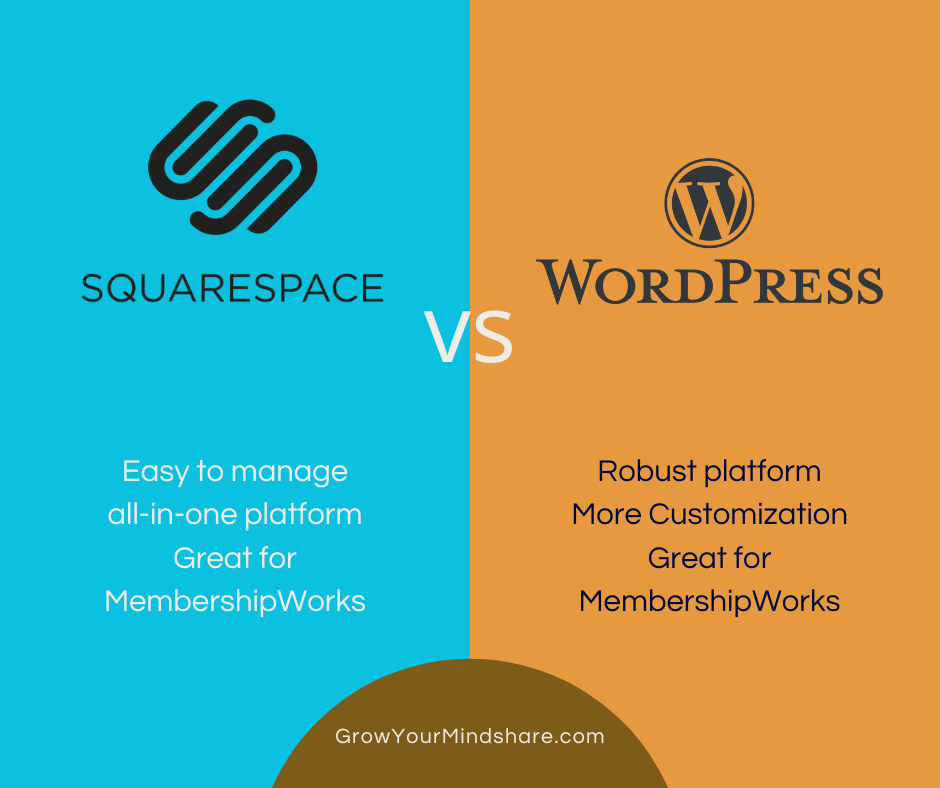
Squarespace vs WordPress for Membership Websites graphic image

If your small business, nonprofit or association manages memberships, renewals, event registrations, or dues, you may be asking yourself is MembershipWorks right for your organization. Is it the platform for you?

I’ve been implementing MembershipWorks for organizations since 2018. I have a lot of happy clients who are using it now. I can share with you who MembershipWorks is a great fit for, who it may not be right for, and the kinds of problems it solves so you can make an informed decision. I am always available to answer your questions during this discovery process.

What Is MembershipWorks?

MembershipWorks is an online membership management platform that integrates directly with your website. It allows organizations to manage:

  • Membership signups and renewals
  • Online payments
  • Member directories
  • Events and registrations
  • Announcement boards and classified ads
  • Donations and sponsorships
  • Revenue Reporting

It works with WordPress, Squarespace, and Weebly, and is designed specifically for organizations that want a centralized, easy-to-manage membership system without building something custom from scratch. Many of my clients have outgrown the spreadsheet method of tracking membership, who has paid, who hasn’t, etc. They are ready to automate and allow multiple members of their leadership team to have access to their membership data when they need it vs relying on one person with “the spreadsheet”. But they don’t want an overly complicated system with too many bells and whistles they will never use and don’t want to pay for.

MembershipWorks Is a Great Fit If…

MembershipWorks works especially well for:

Small nonprofits and associations

Local associations, chambers of commerce, professional groups, and community organizations that rely on memberships to operate.

Organizations tired of spreadsheets and manual tracking

If membership data lives in Excel files, email inboxes, or paper forms — MembershipWorks can replace all of that with one system.

Groups collecting dues, renewals, or recurring payments

Automated renewal reminders and recurring payments reduce late or missed payments and save enormous administrative time.

Organizations with volunteers or leadership turnover

MembershipWorks is easy to train new staff or volunteers on, which is critical when roles change frequently. I provide written documentation and how-to videos specific for each client.

Groups that want members to manage their own information

Members can update their own profiles, pay dues, register for events, and renew memberships from their own member account, reducing administrative work.

Organizations that want everything in one place

Memberships, events, donations, directories, and reporting all live in the same system instead of across multiple tools.

You can see some websites I have created displayed on my Completed Websites page. There are testimonials there, and more on my MembershipWorks developer page on the MembershipWorks website. To learn more about how to implement MembershipWorks, see my Services page.

Common Problems MembershipWorks Solves

Most of the organizations I work with come to me because they’re struggling with:

  • Tracking memberships in spreadsheets
  • Chasing checks or unpaid renewals
  • Manually sending invoices and reminders
  • Keeping member directories accurate
  • Managing events and registrations separately
  • Using systems that don’t talk to each other
  • Finding an affordable option to manage their organization and membership

These challenges often lead to wasted volunteer time, frustrated staff, lost revenue and increased costs.

A common problem I hear from nonprofits is that a talented volunteer builds a robust website with their technical skills and it works great, until they leave the organization. Remaining volunteers don’t know how to manage the website or the membership platform because it’s too complicated, too customized, or it was built with an outdated platform. That’s not good.

MembershipWorks solves these issues by centralizing everything into one integrated system that becomes a seamless part of your website. It’s a system that doesn’t rely on knowing code or deep website knowledge. Plans start at just $35/month too, which makes it very reasonable considering everything that’s included.

If you are a start-up business or organization, it’s hard to know where to begin. It can feel overwhelming. I have a detailed checklist and know just how to manage the project to make sure it’s customized the way you want it to be.

When MembershipWorks Might Not Be the Best Fit

MembershipWorks is a powerful tool, but it’s not for everyone. I tell my clients it’s customizable software, but not custom software.

It may not be the best choice if:

  • You only have a handful of members and no plans to grow (it’s free for up to 50 members)
  • You don’t need online payments, renewals, or event tickets/registration
  • You want a fully custom-coded CRM (Customer Relationship Management) software
  • You’re looking for a marketing automation platform

That said, many organizations start simple and grow into MembershipWorks over time — especially when it’s set up correctly from the beginning. I can implement it in phases or all at once, depending on what you need, your budget, and your timeframe.

Why Implementation Matters

MembershipWorks offers a lot of flexibility. That’s a strength — but it also means setup matters. I work in this platform every day and I can easily guide you through the process.

When implemented thoughtfully:

  • Membership levels and labels make sense
  • Data migration is complete and accurate
  • Renewals run smoothly
  • Reports are easy to understand
  • Volunteers and staff can step in without confusion

When implemented poorly or not completely, it can feel overwhelming.

That’s where I come in.

I help organizations take MembershipWorks from idea → setup → usable system, customized to how your organization works. I want my clients to be happy and I love taking care of all the details to create a system that works for you today and in the future. Read my post Squarespace vs WordPress for Membership Websites to learn more about those two platforms for MembershipWorks.

“I cannot recommend Michelle highly enough! While MembershipWorks has proven to be a wonderful platform, it came with its challenges having no background in website-building. Michelle perfectly listened to and understood our needs/goals and implemented them seamlessly. She is patient, kind, and a pleasure to work with.” Bailey Smith, Club Wheelhouse

Get Started

MembershipWorks is not a complicated CRM overhaul or a bundle of tools that require constant troubleshooting. When set up correctly, it’s a simple, affordable, reliable membership management system that saves time, reduces stress, and supports long-term growth. Its easy to learn, not overly technical.

If you’re considering MembershipWorks and want help deciding whether it’s right for your organization, please give me a call or send me an email.

I’m here to help make managing your membership easier for you!

Michelle Aspelin
MembershipWorks Implementation Specialist
(952) 484-6015
Mindshare Marketing & Implementation Services LLC
Price quoted above is subject to change. See MembershipWorks.com for current pricing.

MembershipWorks logo is blue and white