MembershipWorks introduced its new Sub Memberships feature in November 2026. This new option makes it easier to connect additional members to a Primary Member account, simplify dues payments, and automate the renewal process.
We can now create a Membership Level, called something like “Additional Member”, and assign it to the Primary Member to “link” the accounts together.
- Each Member will have their own Profile in the Membership Directory. The Secondary Member can choose to make their Directory Listing private or public.
- Admins will see the connected account in the Membership Billing tab in each Member’s account automatically.
- If we want both members listed on the Directory Card, we still need to create a custom field to add the other person. I sent a suggestion to MembershipWorks to try to automate this as well.
- The Primary Member and the Secondary Member manage their own labels and their own profile themselves.
- The Primary Member pays for their own dues + the dues for the Sub Membership (Secondary Person).
- You can have multiple Secondary Members attached to a Primary Member.
- Primary Members can add or remove Secondary Members themselves and pay total dues amount accordingly.
For example, if Membership Dues are $25 for individuals, but only an extra $10 for additional members in the same household, or in the same company, we can now “link” the Primary and Secondary Members and consolidate the dues for one simple payment at renewal time. No need to send an invoice for additional members to the Primary person.
How this Impacts the Renewal Date
The Renewal Date will automatically update for the Primary Member AND all their Secondary (Sub) Members who are on the new Sub Membership Level. In the past, Admins had to manually update the Renewal Date in the Secondary Member’s account when the Primary Member paid their annual dues. I love that this automates the renewal process.
If a Primary Member fails to renew their dues and eventually gets deleted, the Secondary Member’s account will now also get deleted. Prior to this, an Admin had to delete the Second Member’s Account manually when the Primary Member didn’t renew.
Using Contacts vs Sub Membership
The new Sub Membership Level works best when both Members need their own Profile in the Directory. We can still use Contacts tab to add a Second Member to a Primary Members Account if they DO NOT need their own Profile.
For example, if a financial planner is the Primary Member, and she wants to include her two assistants as Additional Contacts on her account, it would be best to add them under the Contacts tab vs giving her assistants their own Member Profile. The financial planner only needs one Member Profile for their business, not three. By adding her assistants as Contacts, they will be listed in the Member Profile, and they will receive all the emails that the Primary Member gets, assuming an email address is added in the Contacts tab.
You can still use Contacts for Second Members if the Second Member isn’t heavily involved in the organization and it’s up to the Primary Member to manage their Profile and pay the dues.
Using a Sub Membership Level vs an Add-on
MembershipWorks describes it this way on their website.
“Sub Memberships is a cross between a Membership Level and a Membership Add-On. Members can purchase additional sub memberships (like an add-on), and these sub memberships can be assigned to other accounts (like a membership level).”
Sub Members do not inherit labels/folders from the Primary Member’s account, so access to Member Only discounts, content, event tickets, shop items, and boards, can be restricted independently.
For example, you can restrict an event ticket, so it is only accessible to the Primary Members or only accessible to Sub Members, or both can access. Or you can setup different discount amounts on an event ticket depending on whether the user is a Primary Member or a Sub Member.
Using an Add-on does not give the Second Member their own account like a Sub Membership will do for them.
Sub Membership Account Features and Benefits Detail
There are other options available for the Sub Membership Accounts. Like I mentioned above, you can have multiple Sub Members. And they can be at different rates/levels if that is how your membership is set up right now.
For example, an Individual and Junior Level based on membership benefits. Maybe the Primary Member is an Individual Member with the most benefits, but the Sub Member is new, a Junior Member, with reduced benefits. They can still be linked, if you want, just like we can link two Individuals.
Free Lifetime Memberships
If you have a household where one member is on a free Lifetime Membership and the Secondary Member is paying for an Individual Membership, you should create individual accounts for each of them. We cannot use the Sub Membership to connect them automatically if one is on a free account and one is paying for membership. We can only connect if there is a fee due for each of them.
Initial Setup for New Clients
For new clients who are converting to MembershipWorks, we can set up the Sub Membership Level at the same time we set up the other Membership Levels. If your organization is just getting started, Members can send a link to a Secondary Person so they can sign up themselves online and be connected to the Primary Member automatically. Secondary Members cannot go to a Member Sign-Up Form alone and join. They need the link from the Primary Member, so the accounts get connected.
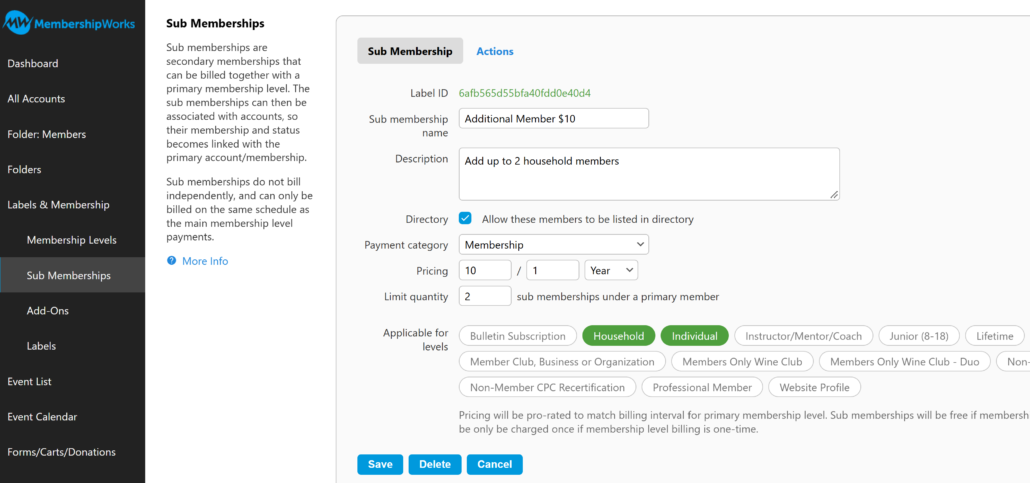
Here’s a screenshot for setting up a Sub Membership Level that costs an extra $10 annually.
Converting Existing Clients
I have over a dozen clients who were set up with a free Additional Member account where the Admin has to manually keep free Additional Members Renewal Date updated because that was the best we could do for them at the time we set up their account. This will eliminate that manual process each renewal period.
I have created a process for CONVERTING and CONNECTING those Additional Members on a free account to a Sub Membership Level. It involves setting up a new Sub Membership Level, determining the dues amount for this Level (to be paid by the Primary Member), and customizing a Welcome Email specifically for the Sub Membership Members.
For existing clients, if you want both the Primary and Secondary Member’s NAMES to both appear on their Directory Card, we will still set up a Custom Field for this purpose.
The MembershipWorks development team has finalized the import feature so I can export your Member List, make the changes to their Membership Levels, and import them again, all at one time.
If you have members on a free Additional Member Membership Level, I would convert them to the new Sub Memberships now available. This will save you time manually updated their Renewal Notice and it will “connect” the Members in MW so Admins can easily see their relationship.
Primary Member Account Example
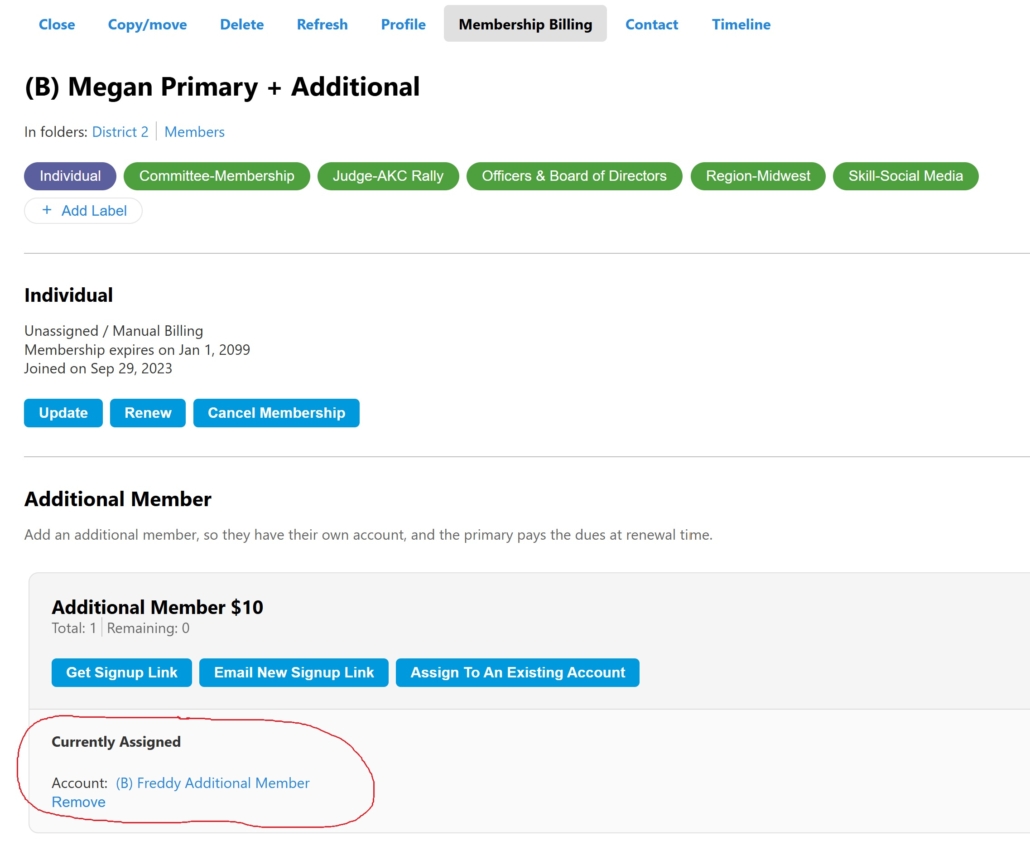
In my Membership Demo on my website, Freddy is a Sub Member of Megan’s account. Here’s what Admins see when they look at Megan’s account in MembershipWorks. You can see Freddy’s info at the bottom to “connect” the two accounts. Freddy’s Member Account lists Megan as well.
You can also see the blue buttons where Megan can invite others to also be Sub Members on her account. In this case, it’s an extra $10.
Membership Level Combined Price
Currently, many of my clients have a price for the Household that includes the second person in that Membership Level. For example, $25 for one member and $10 for the second member means their Household Membership Level costs $35 for the two of them.
If we use the Sub Membership Level for the Second Member, the cost assigned to that Level is $10, and the Primary Member pays it, along with their $25, at renewal time.
That means that the Primary Person should be switched from a Household Membership of $35 to Individual Membership for $25, and they add the Sub Member, so their billing is $25 + $10.
The math works out the same. The organization collects the same amount.
But if you like seeing on your Dashboard how many Members are Household Memberships, that data will look a little different because now they are considered an Individual Member paying for a Second Member. You will be able to see how many Sub Memberships you have, so that might be all you need. This change may not matter to your organization, but I have some clubs that have bylaws with dues amounts and membership types and making a change like this will need to be investigated to make sure it complies with their bylaws.
Questions
You can read more about the new Sub Membership Level on the MembershipWorks website. Here’s a link to their post on November 13, 2026 when they introduced the concept of Sub Memberships. I imagine they will continue to tweak this new feature based on client feedback. This post was written 6 days after the new feature was published on their blog.
https://membershipworks.com/sub-memberships/
When you log into MembershipWorks.com, on the left, scroll down to the HELP section. In the search box type “sub memberships” and you will get how-to instructions for setup and management of the new Sub Membership Level. Here’s a direct link to that article. If you want my help setting this up for your organization, let me know.
https://support.membershipworks.com/portal/en/kb/articles/sub-memberships#Actions
If you’d like your MembershipWorks software to be updated to take advantage of Sub Membership Levels, please Contact Me to discuss how this can work for your organization. You do not need to make a change if you don’t want to.
We can talk about Membership Stats and Reporting, Member Manage, and your Member Sign-Up Form required modifications.
For new clients, I would be happy to talk about the best way to set up your Membership Levels to automate your sign-up and renewal processes as much as possible.
MembershipWorks Demo
In my Membership Directory DEMO, I have set up Megan and Freddy. Megan is the Primary Member and Freddy is on the Sub Membership Level, connected to her.
New clients can read about the multiple ways to set up Memberships in MembershipWorks by reading my page called Membership Level Comparison.
I have a table that describes the pros for each option. Use it as a reference. Contact me directly so I can talk through your options with you and help you decide which option will work the best for your group, organization, or company.
Make sure you know all the ways you can earn revenue for your organization by using MembershipWorks. This is a great way to offset the monthly software fee. Read my post about generating revenue with MembershipWorks.
If you don’t have MembershipWorks yet, visit my post about all the features and benefits this remarkable software has to offer! They are excellent at maintaining their software and I appreciate when they add more features like this that can make my client’s life easier and more automated.
Use the Contact Form to schedule a call or Zoom.
Michelle Aspelin
MembershipWorks Implementation Specialist
Mindshare Marketing & Implementation Services
Call/Text 952-484-6015